Showing posts with label queue. Show all posts

Thursday, July 21, 2016

Microsoft Service bus: Queue, Topic and Event Hub

Selecting between Queue, Topic and Event Hub:


Usage:

Queue:

The scenario for queue is almost clear. Each message will be receive only by 1 receiver.
Of course it is possible to have multiple senders and multiple receivers, but the key point is that each message will receive only to one of those receivers.

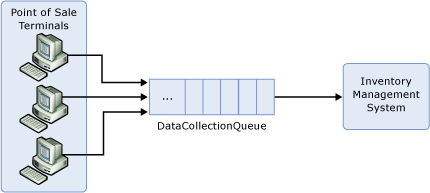
A simple example of using queues is POS (point of sale) systems. POS terminals produce some data with different load/times and the inventory management system has to process all of them. The inventory system and the Terminals are loosely coupled there might be different softwares in each terminal, but there is only 1 receiver on the other end.

Topic-subscription:

This type of queue will be used when a single message has to be received by multiple receivers. It is also possible to differentiate between receivers so a group of receivers will only receive special types of messages.
The same as queues, there can be multiple instances of sender/receivers (multiple receiver per subscription) is available, but when a receiver reads data from 1 subscription, the others cannot read it again from the same subscription.
A simple example for this scenario is logging/Search. You want to have an instance of your data to use in a logging (search) system, but there has to be no relation between your realtime system with the logging system rationally.

The second scenario is also possible when you want to divide your messages into different lines. Like when you want to create a priority queue, or when a set of producers produce data for different systems. 
A simple example for this would be when you create data in a way and process them in different manners. For instance if there is an ordering system registers orders for different companies, then each company only needs to know about its orders.

Event-Hub:

Event Hub is simply a big stream of data. In a way, Event hub is the answer for the same issues that we addressed in the Topics. There are multiple consumers for each message, but the big difference is that Event-hub has been implemented for maximizing the throughput.
Each Topic in event hub will multiple partitions (normally between 4 to 16) and 1 instance of the client will read from each partition. If any of the clients goes down or there are less clients that the partitions, clients will compete against each other to access to more partitions.

A simple scenario for this solution is logging players actions in a popular game. 

How they Access data

Queue:

There is only 1 line of messages. Clients wait for a message and when a new message received, only one of them will process it.

Topic-subscription:

There is only multiple lines of subscriptions. Clients of a subscription wait for data and the same scenario as queues happens here. It is important to note that there is no relation between data in different subscriptions.

Event-Hub:

Clients are responsible for the data that they read. Meaning that it is possible for different clients to read a message multiple time. Messages would not remove from system until a reasonable time (some days), or depending on size of data. 
Each client will ask the hub for data after special message (check point) so it is very possible to see some messages has been read multiple time when a client restarts.
There is a concept of Consumer Groups which is almost the same as subscription in the topic base service bus.

How to manage failure

Topic-subscription:

There is 2 ways of receiving a message:

1- PeekLock (default)

Data will be read by the client and it will be locked for some time. When the client finished its work, it simply tells to the broker that and the broker will remove the item from queue.
If an error happens in the process client can abandon the message, therefore another client would read the same message later on in case that the error was temporary.
Also, if the client crashes in the middle of the process, the lock will be time outed and the message will be readable for another client.

2-ReceiveAndDelete

The broker doesn't care about the probable errors. It simply say the message will be read 1 times max!

Event-Hub:

Messages will be in the hub for a long time, so we can be sure that data will be read by clients at least 1 time. 
Each client will set a check point after a portion of time (or any rule that the clients decides) and if it restarts, it will continue reading from that checkpoint again. So the client has to take care of duplicates it self.

Installation Environment

Queue and Topic-subscription are available on both Microsoft Azure (cloud) and on premise but Event-Hub is only available on the Azure.

Read More
Azure Event Hubs overview

Tuesday, March 8, 2016

A simple queue for EpiServer

Intro
Queuing is one of the base procedures that you may need as a software developer specially if you are working on web.Think as a task that you want to make sure that it will be done, but you don’t want to suspend your current process for it. for instance you want to send an email in a part of a method or task. you don’t want to wait for email response and you want to try sending it for many times, but you never want your methods to wait for it.
If you are developing on EpiServer, you probably know that there is a dynamic data type which is pretty good for implementing a queue.

Cecilia von Wachenfeldt has a post in here where she describes a simple solution for that. However, I don't like to have both queue and queue item on the same class. From the software architectural view, we have to have a queue class that handles primitive queuing functions (adding to queue, finding unprocessed items, Processing items and deleting them). Then for each type queue, we can just create a corresponding queue-able Item and ask use our queue to handle the object :)

Theory

There has to be a queue, with queue functions. There has to be an enum for the status of the item. Then the queue has to handle everything using each items methods.

This is the list of classes that we need:

1- Queue
2- An interface for Queueable Items (IQueueable)
This interface contains properties that the queue will use like ErrorCount, LastError, Status, etc. and basic methods for processing each special type Like Process().
3- Queueable item which inherits from our IQueueable
This item is simply the object that we want to save into DB. It contains our queue properties/methods and also the required data that you need to use, in order to proceed.

Implementation
Lets say that we want to implement an email queue system, so if the network was down or etc, we won't loose any emails. Our queue and IQueueable are of course the same but for the Queueble Item we have something like this:
First, we have to implement our enum to decide if the item is
Code:
public enum QueueItemState
{
Queued = 0,
Processed = 1,
Retrying = 2,
Failed = 3
}
Then we have to write our Interface:
public interface IQueueableItem
{
int ErrorCount { get; set; }
string LastError { get; set; }
DateTime? QueuedTime { get; set; }
DateTime? CompeletedTime { get; set; }
EnumsQueueItemState State { get; set; }
void AddError(string errorMessage);
bool Process();
Identity Save();
void SetToFaild(string errorMessage);
}

Then we have to implement our interface and add our additional functionality/properties:
(Pay attention to EPiServerDataStore property that cause Episerver to save this item into DynamicData )
Code:
[EPiServerDataStore(AutomaticallyRemapStore = true, AutomaticallyCreateStore = true)]
public class QueueableEmailItem : IDynamicData, IQueueableItem
{
.... [IQueueableItem properties]
public string EmailSubject { get; set; }
public string EmailBody { get; set; }
public string EmailTo { get; set; }
public int? EMailPriority { get; set; }
public bool Process()
{
var priority = EMailPriority.HasValue ? (MailPriority)EMailPriority.Value : System.Net.Mail.MailPriority.Normal;
MailService.Service.Send(EmailSubject, EmailBody, EmailTo, priority, attachedItems);
return true;
}
}

We will need a QueueBase class that handles your queue items. The queue will try to read and execute data that implement IQueueableItem. 
There is only one problem, which is reading items from DB with generics, So I just do the process in the queue base and do the other stuff in the inherited classes using polymorphism.
Code:
public abstract class QueueBase where T : IDynamicData, IQueueableItem
{
public void Proceed()
{
var queue = GetQueuedItems();
if (!queue.Any())
return ;
foreach (var item in queue)
{
try
{
// Exit if the error count is greater or equal to the retry count
if (item.ErrorCount >= RetryCount)
{
item.SetToFaild("RetryCount limit");
continue;
}
if (item.TryProcess())
{
item.State = Enums.QueueItemState.Processed;
item.Save();
continue;
}
item.State = Enums.QueueItemState.Retrying;
item.Save();
}
catch (Exception ex)
{
if (item.State!= Enums.QueueItemState.Failed)
{
item.State = Enums.QueueItemState.Retrying;
}
item.AddError(ex.message);
item.Save();
}
}
}
}
Of course you can have a better code, add logs/ return report/ send email to admin if failed, etc. but this is the simplest code that I could come up with :)
Now we will need to inherit from this class for the emailQueue:
Code:
public class EmailQueue : QueueBase<QueueableEmailItem>
{
public Identity AddToQueue(string to, string emailSubject, string body, MailPriority mailPriority = MailPriority.Normal)
{
var item = new QueueableEmailItem
{
EmailTo = to,
EmailSubject = emailSubject,
QueuedTime = DateTime.Now,
State = Enums.QueueItemState.Queued,
ErrorList = new List<string>(),
EmailBody = body,
EMailPriority = (int)mailPriority
};
return item.Save();
}
protected override List<QueueableEmailItem> GetQueuedItems()
{
var store = typeof(QueueableEmailItem).GetStore();
var query = (
from item in store.Items<QueueableEmailItem>()
where item.State == Enums.QueueItemState.Queued || item.State == Enums.QueueItemState.Retrying
select item);
return query.ToList();
}
}